

Integration
Sync Fathom meetings into SmarterMeetings
Fathom is excellent at capturing call notes—but most teams still lose context when follow-up lives in email, spreadsheets, or a separate CRM. SmarterMeetings pulls Fathom meetings into a unified inbox where you can tag clients, extract tasks, and push summaries to Salesforce without copy-paste. For the full Fathom to Salesforce workflow, see our CRM meeting logging guide.
- Connect with your Fathom API key in minutes
- Automatic sync on a schedule or on demand
- Full transcripts and provider summaries in one searchable list
- Tag meetings to clients and track reviewed vs. unreviewed
- Push call summaries to Salesforce on Personal Pro and Team plans

Consultancies and agencies often run Fathom alongside Zoom or Google Meet. SmarterMeetings lets you combine Fathom with up to nine other meeting providers in the same workspace—so your team reviews every client conversation from one place.
After sync, use AI prompts to extract action items, summarize long calls, or answer questions about a client's history. Tasks stay linked to the meeting they came from, and owners can track open work from the home dashboard.
For revenue teams, the Salesforce integration logs calls, links Accounts and Opportunities, and applies AI-suggested field updates from transcript context—turning Fathom recordings into pipeline hygiene instead of admin work.
Setup takes minutes: paste your Fathom API key in Settings, pick a sync cadence, and watch new calls appear in the inbox with full transcripts and Fathom summaries intact. No CSV exports, no Zapier maintenance when someone rotates credentials.
Partners prepping for a renewal can filter by client, skim unreviewed Fathom calls from the quarter, and open Salesforce from the same meeting detail—so the narrative in the room matches what's logged in CRM.
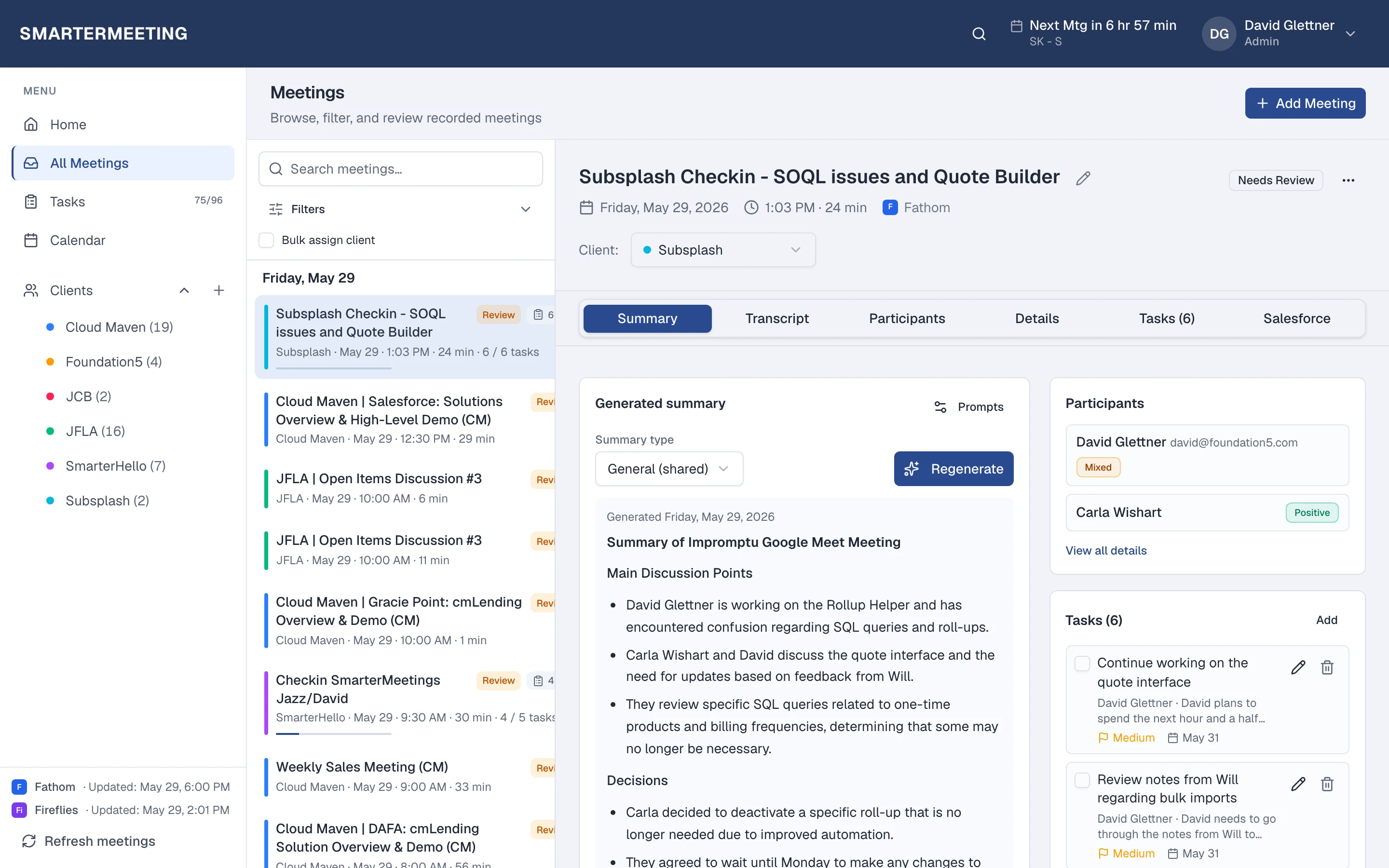
Fathom calls in your unified inbox · actual workspace
What you see after sync
Every Fathom meeting appears in the same list as your other providers—with transcript, summary, tasks, and client tags on the detail panel. Filter by provider when you want only Fathom, or by client when you need the full account story across every recorder your team uses.
Review status shows partners which calls still need a pass before the next engagement. Open tasks roll up to the home dashboard so Monday prep isn't a scavenger hunt through forwarded recap links.
Explore all features →Fathom to Salesforce workflow: Start with the CRM meeting logging guide for the step-by-step sync, review, and Salesforce push process. This integration page covers Fathom setup only.
Wondering how Fathom alone compares to adding SmarterMeetings? Read: Fathom vs SmarterMeetings →
Related integrations
Related guides
Frequently asked questions
- Do I keep using Fathom?
- Yes. Fathom continues to capture and summarize your calls. SmarterMeetings syncs those meetings into one workspace for client tags, tasks, and review—without replacing your recorder.
- How often does Fathom sync?
- You choose a schedule (weekday business hours by default) or click Refresh meetings anytime after connecting in Settings.
- Which SmarterMeetings plan do I need?
- All plans include multi-provider sync and tasks. Personal Pro and Team add Salesforce logging when you need CRM push from synced meetings.
- Can I push Fathom meetings to Salesforce?
- Yes, on Personal Pro and Team plans. Link records from the meeting detail, review AI-suggested field updates, and push summaries without copy-paste.