
Meeting execution · CRM intelligence
Turn meeting conversations intoaction.
SmarterMeetings enhances the recorders you already use—Zoom, Teams, Fathom, and Fireflies—turning their recordings into tasks, CRM updates, and accountable follow-up.
7-day free trial available · Card required · Not charged until trial ends
- Enhances your recorders
- 10 meeting providers
- Salesforce on Pro & Team
- 7-day free trial
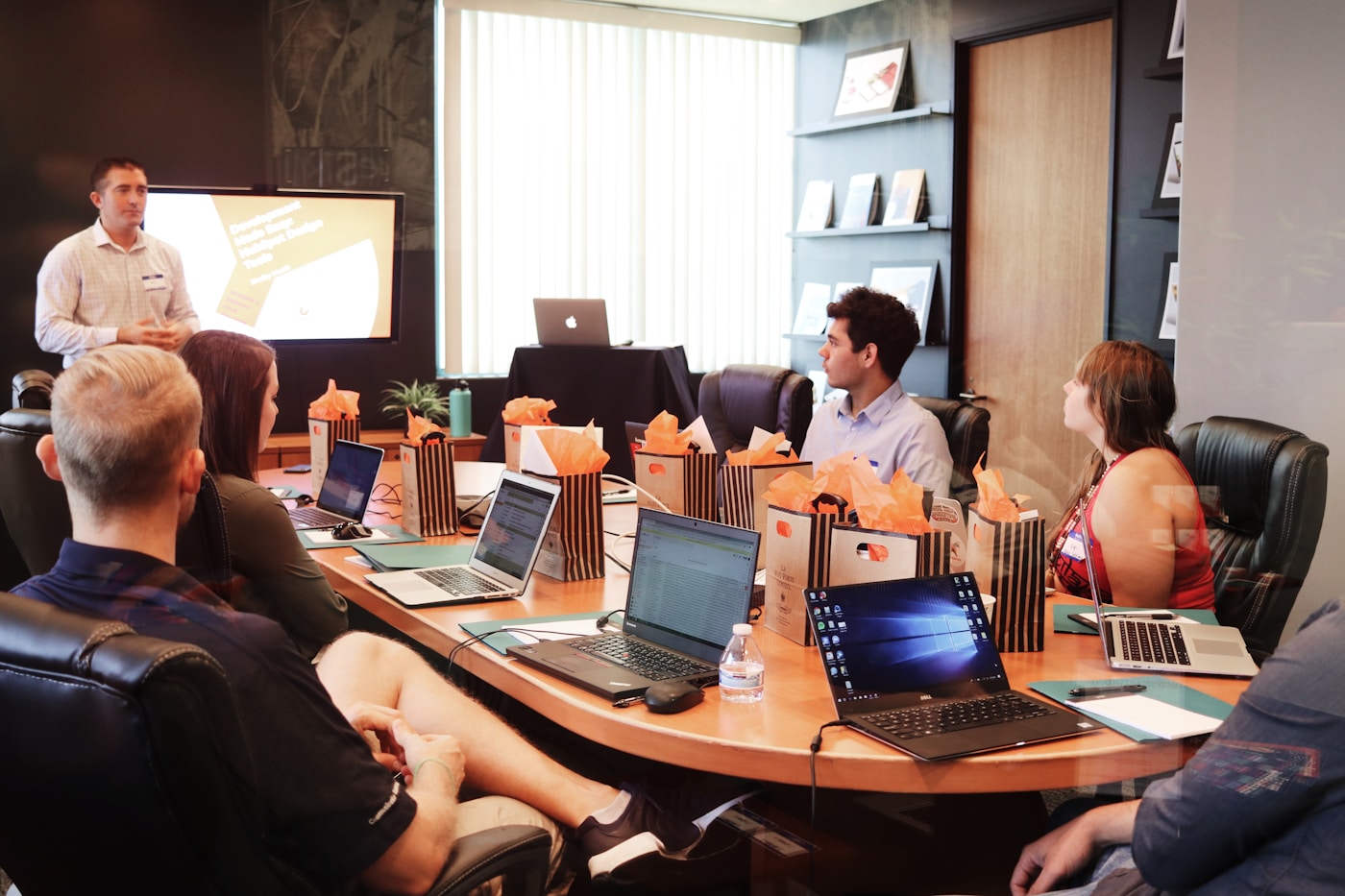


Revenue team turning a client meeting into accountable follow-up
Built to enhance, not replace
Keep your meeting providers. Add the follow-up layer.
SmarterMeetings does not replace Zoom, Fathom, or Fireflies—it sits on top of them. Keep capturing calls the same way; we sync transcripts, extract action items, and push accountable follow-up to your CRM and task queue.
Your recorders
Fathom, Zoom, Teams, Fireflies, and more capture the call as usual.
SmarterMeetings
Syncs transcripts, extracts action items, and organizes by client.
Your team & CRM
Owned tasks, Salesforce updates, and a review queue everyone trusts.
Customers
Teams that turn recordings into follow-up
Consultancies, agencies, and SaaS operators use SmarterMeetings to finish what their notetakers start—actionable notes and tasks in one workspace.








7-day free trial · Plans from $25/month
The problem
Most organizations already record meetings. The problem is what happens after.
Recording is solved. Execution is not. Action items get forgotten, follow-ups slip, CRM data goes stale, and accountability disappears between calls.
Action items are forgotten
Commitments live in transcript minute 42—or a notetaker tab no one opens after the call ends.
Follow-ups are missed
Recaps sit in email threads while the next client touchpoint arrives without a clear owner.
CRM data becomes stale
Reps stack calls all day but pipeline fields and activity logs lag behind what was actually discussed.
Team accountability disappears
When context lives in personal recorder accounts, handoffs and renewals depend on who remembers the call.
Industry benchmarks and pilot customer metrics coming soon—we publish only verified outcomes.
Common questions
- Does SmarterMeetings replace my meeting providers?
- No. SmarterMeetings enhances the recorders and platforms you already use—Fathom, Fireflies, Zoom, Teams, and more. Keep capturing calls the same way; we add the follow-up layer with tasks, client organization, and CRM push in one workspace.
- Who is SmarterMeetings for?
- Consultancies, agencies, and revenue teams that already record client calls and need accountable follow-up, Salesforce hygiene, and shared client context—not another notetaker.
How it works
From recording to accountable follow-up
Your notetaker captures the call. SmarterMeetings operationalizes what was discussed—tasks with owners, CRM updates, and a team queue everyone can trust.
Step 1 · Import
Enhance the recorders you already use
Keep Fathom, Fireflies, Zoom, Teams, Google Meet, and more—SmarterMeetings connects on top and syncs transcripts and summaries on a schedule you control. No switching providers, no manual export, no forwarded recap links.
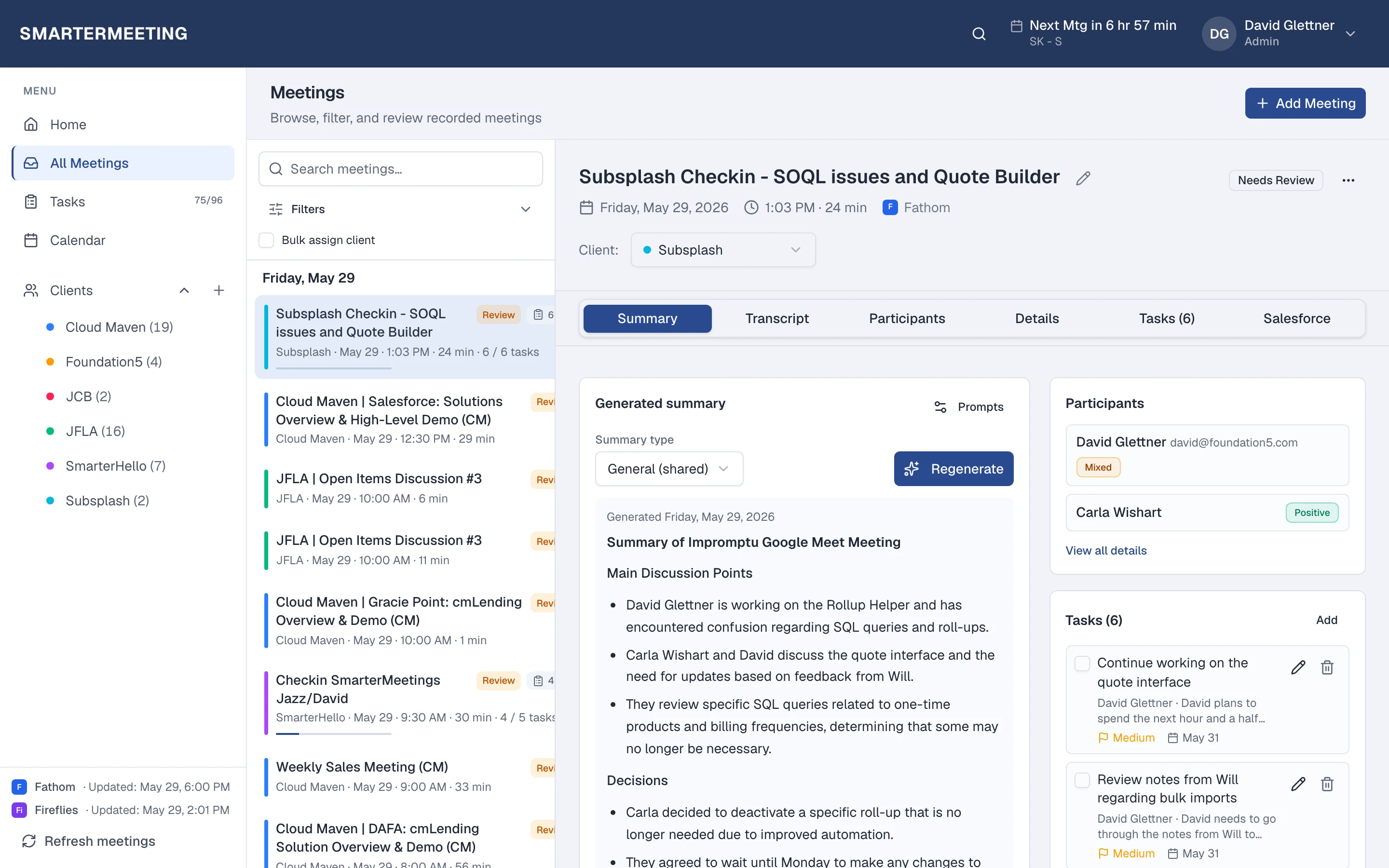
Actual workspace · live account
Step 2 · Identify
AI identifies decisions, action items, and customer intelligence
Open any synced call: read the summary, scan the transcript, and run AI extraction for action items, risks, and opportunities—grounded in what was actually said.
Meeting list & filters
Provider and client filters
Transcript & summary
Full meeting context
Tasks on the meeting
Action items in one place
Step 3 · Execute
Tasks and CRM updates are created automatically
Approve AI-suggested tasks with owners and due dates, then log the call in Salesforce—link Accounts and Opportunities and apply field updates reps will trust.
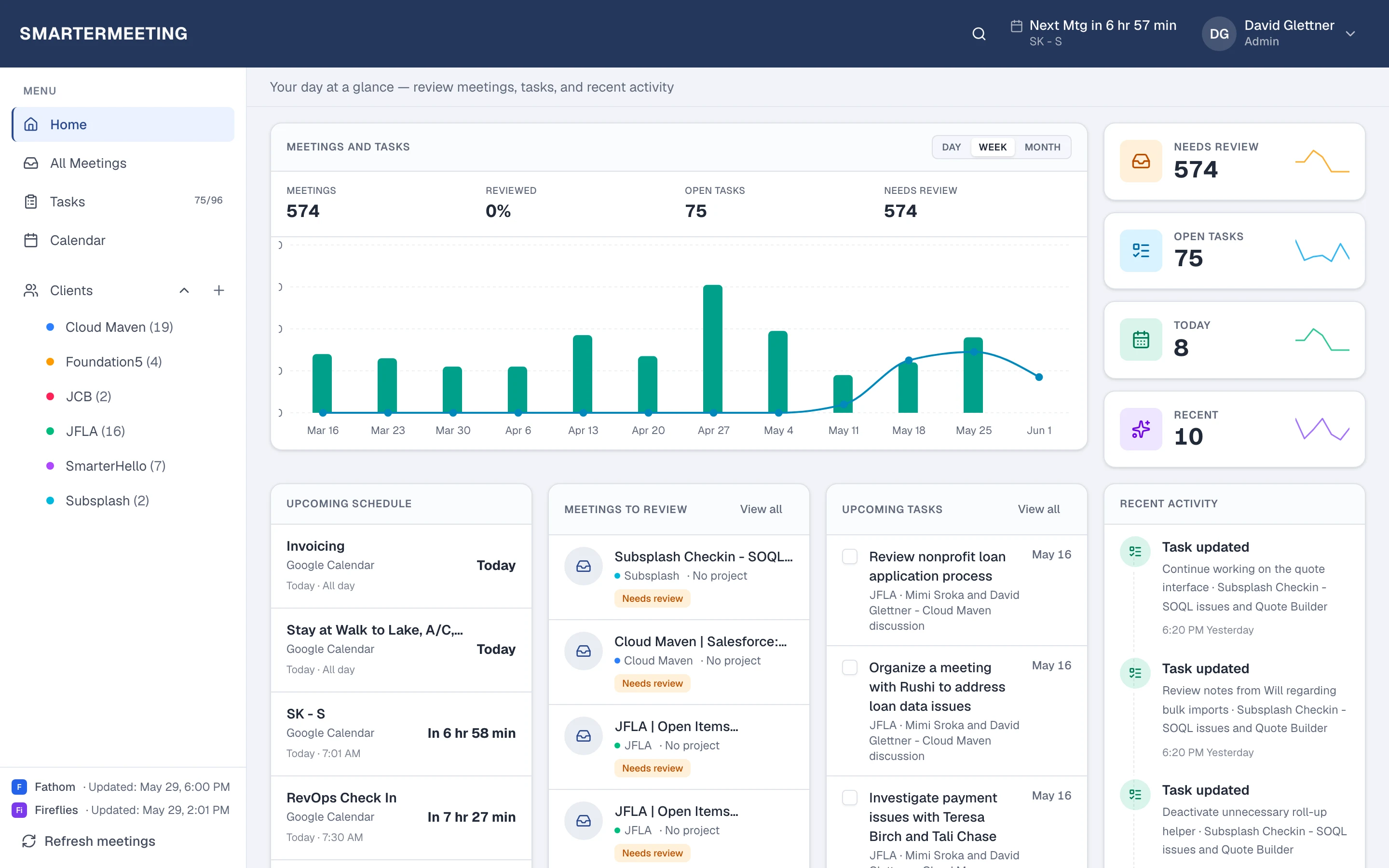
Actual workspace · live account
Step 4 · Align
Teams stay aligned and accountable
Home shows unreviewed calls and open tasks—Monday prep starts with a queue of accountable follow-up, not a scavenger hunt across notetaker dashboards.
Open tasks
Across every synced meeting
Upcoming meetings
Calendar with join links
Get started
Ready to turn your next meeting into accountable follow-up?
Connect a meeting provider in minutes. Your next call can land as owned action items and CRM-ready summaries—not another forgotten transcript.
Lifestyle photography from Unsplash
Salesforce
Built for Salesforce Teams
Most visitors compare SmarterMeetings to notetakers. The real differentiator is CRM execution—turning conversations into logged activities, updated Opportunities, and follow-up your reps will actually complete.
Included on Personal Pro and Team plans. Connect your org once in Settings—reps inherit the connection.
Opportunity updates
Apply AI-suggested field updates from transcript context—reps approve before anything hits the pipeline.
Activity logging
Log completed calls with meeting summaries attached—no copy-paste from your notetaker into Salesforce.
Account intelligence
Link meetings to Accounts and see call history alongside the records your team already owns.
Contact enrichment
Connect Contacts and Leads to meeting context so stakeholder conversations stay tied to the right people.
Task creation
Push action items from approved meeting tasks into Salesforce as completed follow-up work.
Follow-up tracking
Review queues and task lists show which calls still need CRM push—managers see accountability, not hope.
Pipeline visibility
Keep forecast and stage data aligned with what was said on the last discovery or renewal call.
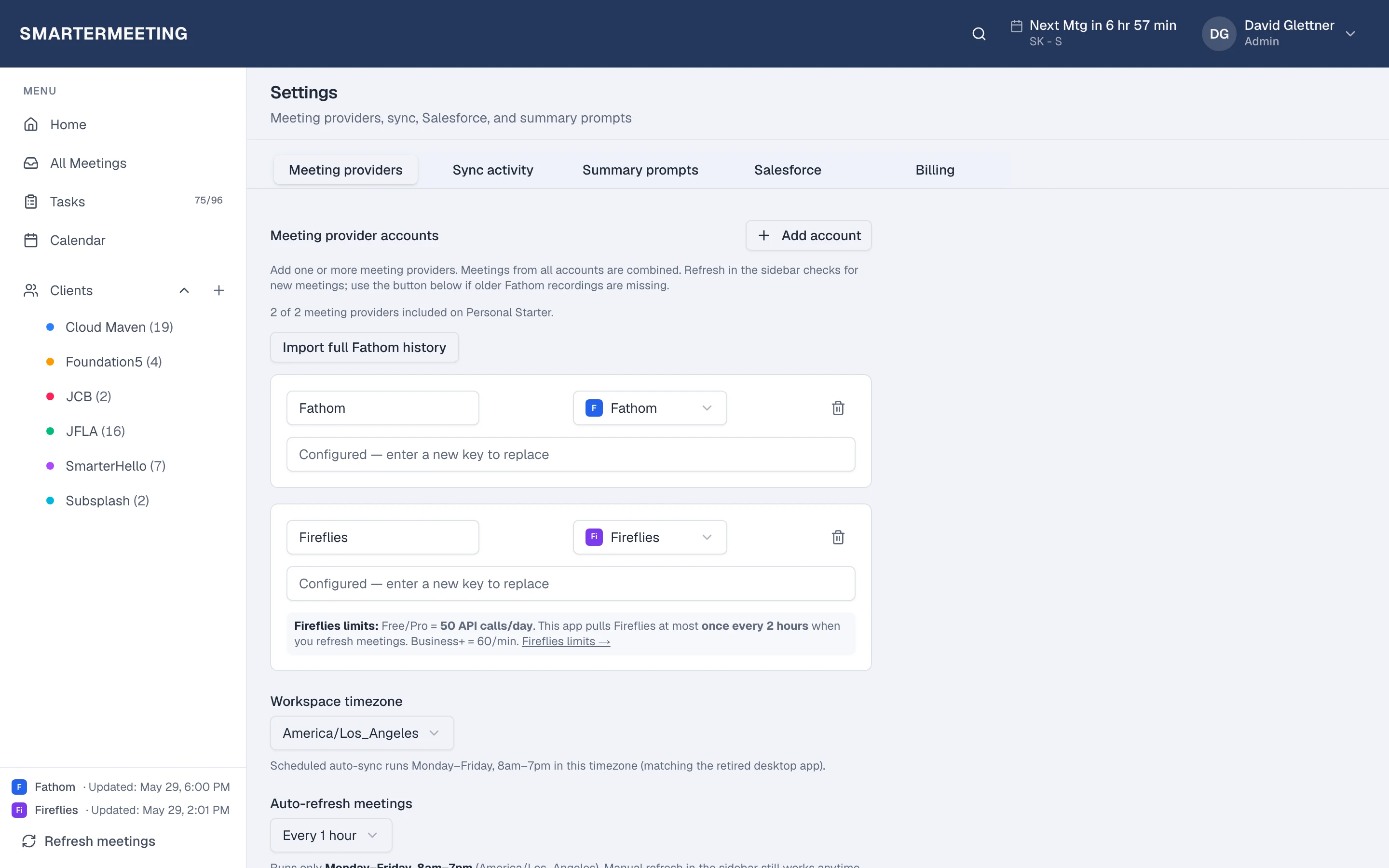
Actual workspace · Salesforce connection & meeting CRM actions
Integrations
Works with—and enhances—the recorders you already use
SmarterMeetings pulls transcripts from your meeting stack and adds the follow-up layer: execution, tasks, and Salesforce push in one workspace. No rip-and-replace.

Fathom
API key
Fireflies
API key

Google Meet
OAuth

Loom
API key
MeetGeek
API key
Microsoft Teams
OAuth

Otter
Bearer / OAuth

Webex
OAuth

Whereby
API key

Zoom
OAuth
CRM execution via Salesforce. Connect providers in Settings after you create your workspace.
Get started
Plug in your stack today
OAuth and API keys where each vendor requires it—keep your recorders, add accountable follow-up.
Product demo
See how meetings become accountable follow-up
From recorded call to Salesforce update in one workflow—what your team sees after every client conversation.
90-second demo coming soon
Set NEXT_PUBLIC_DEMO_VIDEO_URL after publishing your walkthrough video.
- 1
Meeting recorded
Your team captures the call in Fathom, Zoom, Teams, or Fireflies.
- 2
Transcript imported
SmarterMeetings syncs recordings into one workspace automatically.
- 3
AI identifies action items
Decisions, risks, opportunities, and follow-ups surface from context.
- 4
Tasks generated
Action items get owners and due dates—ready for your team to commit.
- 5
Salesforce updated
Log calls, link Opportunities, and apply approved field updates.
- 6
Team stays aligned
Everyone sees the same queue of reviewed calls and open follow-up.
Customer outcomes
Teams that execute on what was discussed
Customers purchase outcomes—not features. These teams use SmarterMeetings to close the gap between recorded conversations and CRM execution.
Cloud Maven
Pilot customer“Pushing meeting summaries into Salesforce as completed tasks means our pipeline stays current. It is the first meeting tool the whole sales team adopted.”
Quantified outcomes pending customer approval.
Foundation5
Pilot customer“Connecting Fathom and Zoom into the same workspace saved hours of hunting through inboxes. The client tagging alone changed how we prep for engagements.”
Quantified outcomes pending customer approval.
Muraway Movers
Pilot customer“We run dozens of client calls a week. SmarterMeetings finally gives us one place for transcripts, tasks, and Salesforce updates—our reps actually follow up now.”
Quantified outcomes pending customer approval.
Read full stories: Cloud Maven, Foundation5, or browse all customer stories.
Pricing
Simple, transparent plans
Choose the plan that fits how you work. Every plan includes a 7-day free trial—upgrade anytime from Settings in the app.
| Personal Starter$25/month | Personal Pro$45/month | Team$50/seat/month | |
|---|---|---|---|
| Price | $25/month | $45/month | $50/seat/month (4-seat minimum) |
| Best for | Solo consultants and operators | Revenue reps with Salesforce | Agencies and RevOps teams |
| Est. time saved | [TBD] hrs/month saved on follow-up admin | [TBD] hrs/month saved on CRM updates | [TBD] hrs/month saved across the team |
| Meeting providers | 2 per user | 5 per user | 5 per user |
| Salesforce | |||
| Seats | 1 user | 1 user | Min. 4 billed seats |
| Free trial | 7-day trial (card required) | 7-day trial (card required) | 7-day trial (card required) |
Time-saved estimates are placeholders until pilot ROI data is verified. Use the ROI calculator on the pricing page for a team estimate.
- *All plans include a 7-day free trial. A card is required; you are not charged until the trial ends.
- *Team plans require a company email domain (not Gmail, Outlook, etc.).
- *Team billing quantity follows active team members, with a 4-seat minimum.